> For the complete documentation index, see [llms.txt](https://docs.vultisig.com/llms.txt). Markdown versions of documentation pages are available by appending `.md` to page URLs; this page is available as [Markdown](https://docs.vultisig.com/vult-token/airdrop/airdrop-v2.md).
# Vultisig airdrop V2 (concluded)
The $VULT airdrop is concluded. This page is the published V2 design record. Current utility is in-app swap fee discounts.
{% hint style="warning" %}
**Concluded.** The $VULT airdrop is finished. There is no registration, no VULTIES accrual, and no seasonal distribution. This page is the published design record. Current utility: [in-app fee discounts](/vult-token/vult/in-app-utility.md).
{% endhint %}
Season 0 and V2 used this published formula:
$$
vault\_asset\_value\*time\_in\_vault
$$
While taking into account other multipliers, such as swap volume and referral multipliers, to further increase the virality.\
See further calculation [here](#calculations).
***
## Airdrop Process
The following was the published process while the airdrop ran.
Users registered vaults by sending exported vault public keys to an airdrop registry, which checked for funds on chains and then counted airdrop value.
This included most actions performed in Vultisig (such as binding to nodes and staking).
**A scan ran every cycle (day). Airdrop value accumulated as VULTIES (airdrop points).**
Users who kept funds in Vultisig longest and used the vault actively earned the highest airdrop value.
Points reset after each [season](#seasons) and could be multiplied. Multipliers are listed [below](#multipliers). The final share per season was the pro rata share of that season's allocation.
***
## Eligible assets
Assets needed a dollar value from an external provider in order to accumulate VULTIES (airdrop points).
BTC
Supported assets were:
* L1 tokens supported by Vultisig
* Tokens supported by 1inch, Jupiter and displayed on the airdrop website
* THORChain Bonds, LP(dual and single)
* MAYA Protocol Bonds, LP(dual and single)
* vTHOR
* Staked TON
Assets were auto-discovered. If not discovered, they could be added manually to check eligibility.
***
## Airdrop amount
The published allocation was **6,000,000 $VULT** (6% of total supply):
Season 0: 1,000,000 $VULT\
Season 1-4: 5,000,000 $VULT, at the end of each season.
***
## Seasons
The published plan used a seasonal structure for early supporters and later joiners.
Each season lasted 1 quarter, with 1,250,000 $VULT to distribute.
**Airdrop points reset after each season.**
***
## Multipliers
The published design introduced multipliers starting with Season 1.
### **Swap Volume Multiplier**
A swap multiplier rewarded active users with a higher airdrop share based on swap volume. The multiplier reset each season.
### **Referral Multiplier**
The [Referral Program](#referral-program) tracked referred wallets via the [Referral Telegram bot](broken://pages/nhXgIt8NEZZXgPP1V1Ea).
A referral counted when the referred wallet funded with at least $50 and took part in the airdrop.
{% hint style="info" %}
The referred wallet had to keep at least $50 in the vault, or the referral was voided.
{% endhint %}
This multiplier scaled logarithmically and capped at 500 referrals, up to a 2x boost. Unlike other multipliers, the referral bonus did not reset between seasons.
### Dedicated tokens and community multipliers
Selected tokens and NFTs carried a higher multiplier.
$VULT itself granted a 1.5x multiplier on its dollar value in the airdrop calculation.
Published token and NFT multipliers:
| Token | Multiplier |
| ----- | ---------- |
| $VULT | 1.5 |
| $RUNE | 1.3 |
***
| NFT | Multiplier |
| ---------- | ---------- |
| Thorguards | 1.3 |
***
## Calculations
### Daily airdrop points per user
$$
user\_VULTIES += SQRT($\text{total\_vault\_value})
$$
### Swap Volume multiplier
$$
\text{swap\_volume\_multiplier} = 1+0.002\*SQRT(\text{swap\_volume\_per\_season})
$$
### Referral multiplier
$$
\text{referral\_multiplier} = \min\left(2, 1+\frac{\log(1+\text referred\_wallets)}{\log(1+500)}\right)
$$
### Adjusted airdrop points per user
$$
\text adjusted\_user\_VULTIES = \text user\_VULTIES\times \text {swap\_volume\_multiplier} \times \text{referral\_multiplier}
$$
### Seasonal $VULT share
$$
\text{user\_airdrop\_share} = 1,250,000 \times \left( \frac{\text{adjusted\_user\_VULTIES}}{\text{total\_adjusted\_VULTIES}} \right)
$$
***
## How Season 0 registration worked
{% hint style="warning" %}
**Concluded.** These steps are the old Season 0 flow. `airdrop.vultisig.com` is not a product surface. Do not follow them.
{% endhint %}
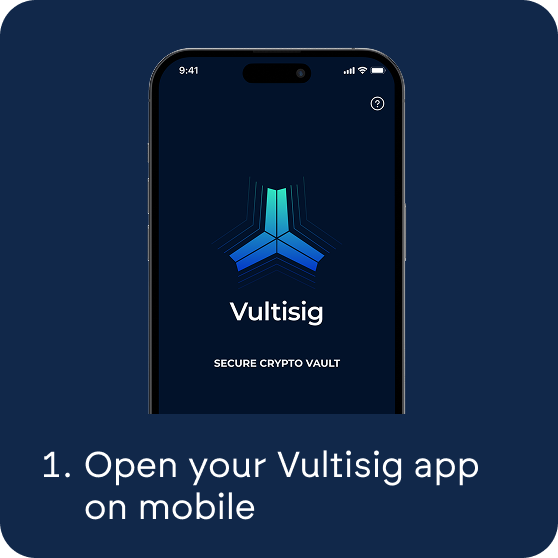
* Download and open your Vultisig app
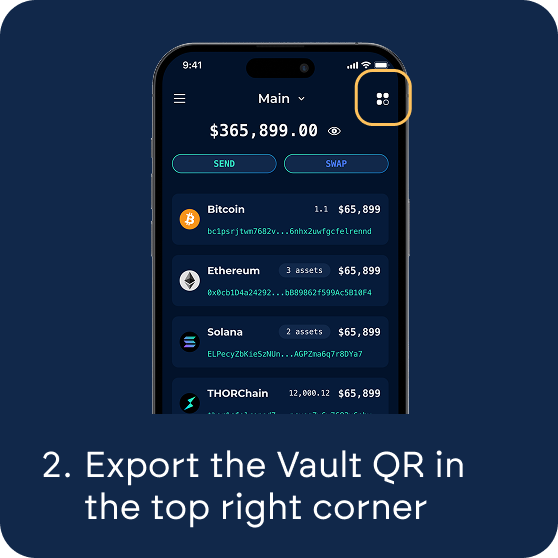
* [Export](/app-guide/vault-management/vault-qr.md) the Vault QR of the Vultisig Vault
* Connect to the [airdrop](https://airdrop.vultisig.com/import) page with your Vultisig Extension ([Chrome](https://chromewebstore.google.com/detail/vulticonnect/ggafhcdaplkhmmnlbfjpnnkepdfjaelb) or [Firefox](https://addons.mozilla.org/en-US/firefox/addon/vultisig-extension/)) or by uploading your Vault QR\\
* Join the Airdrop with your connected Vault by clicking `Join Airdrop`\\
* Go to the `Balances` tab and check for auto-discovery or enable **ALL a**ssets you want to have counted towards the airdrop
* Earn VULTIES (Airdrop points) and track the leaderboard
* Register multiple Vaults
{% hint style="info" %}
While the airdrop ran, every chain and token that should count had to be enabled once.
{% endhint %}
***
### Referral Program
The [Telegram bot](broken://pages/nhXgIt8NEZZXgPP1V1Ea) was used to invite friends and track referrals while the airdrop ran.
* Invite people
* Let them install Vultisig
* Fund the wallet with at least $50 of assets
* Referral count raised the airdrop share
That path is closed. The airdrop is concluded.
## Privacy
{% hint style="warning" %}
**Registration is closed.** The airdrop is concluded. The published note was that public keys would be purged after the airdrop finished, and that no other user information was collected.
{% endhint %}
Read the [Privacy Policy](/help-and-legal/privacy.md)
---
# Agent Instructions
This documentation is published with GitBook. GitBook is the documentation platform designed so that both humans and AI agents can read, navigate, and reason over technical content effectively. Learn more at gitbook.com.
## Querying This Documentation
If you need additional information that is not directly available in this page, you can query the documentation by asking a question.
Perform an HTTP GET request on the following URL with the `ask` and `goal` query parameters:
```
GET https://docs.vultisig.com/vult-token/airdrop/airdrop-v2.md?ask=&goal=
```
`ask` is the immediate question: it should be specific, self-contained, and written in natural language.
`goal` is what the user is ultimately trying to achieve, the reason they need the answer. Sharing it helps GitBook give you a better, more relevant answer. A goal is most helpful when it describes the outcome the user wants rather than restating the question. For example, with `ask=how do I create an API token`, a goal like `automate deployments from our CI pipeline` lets GitBook tailor the answer to that use case.
The response will contain a direct answer to the question and relevant excerpts and sources from the documentation.
Use this mechanism when the answer is not explicitly present in the current page, you need clarification or additional context, or you want to retrieve related documentation sections.
.png?alt=media)
.png?alt=media)